
Introduction
This document contains a complete workshop for a Smart Factory Data Lake developed by Michael Hanisch and Jan Metzner
Abstract
In moving from a standard factory to a smart factory you need to get insight into the factory which means extracting the data from the machines, collecting data about the products produced and the processes, and combining all of this operational data with data from the enterprise applications. In this workshop, participants will learn how to securely connect a whole factory containing several production lines with PLCs.
During the workshop, participants will build an end-to-end solution which includes connecting the machines, ingesting the data into a data lake and then running analyses on the data lake.
Covered Topics and Learning Goals
This workshop uses a complete deployment of virtual factory with PLCs exposing the data via OPC-UA. Over the course of the workshop, the participant will learn
- how to connect to industrial machines using AWS Greengrass and Lambdas
- how to build complex multi-step logic that runs on an edge gateway, i.e., an industrial gateway component located in a manufacturing site
- how to securely ingest, store and analyse industrial telemetry data and automatically derive insights from the data.
Prerequisites
To allow participants to execute this workshop as described, the following requirements must be met:
- Every participant must have a laptop running either Windows, Linux or macOS. iPads or similar devices are insufficient or create additional challenges that are not covered by this documentation (and most likely need to be solved by the participant on their own).
- An AWS Account with a user that has the (administrator) access rights to create IAM roles/policies, deploy EC2 instances and various other resources in at least one of the regions N. Virginia, Oregon, Frankfurt, Ireland, Sydney or Tokyo.
- A modern web browser (HTML5) for accessing the AWS console.
The completion of the workshop takes around 2 hours, but may take longer depending on the experience of the participant. The AWS resources deploying during and for the workshop will usually incur less than USD 1 in terms of charges. To avoid unnecessary charges, the AWS resources created in the workshop should be deleted once the workshop is finished.
Getting Started
Event Engine
If you are at re:Invent or another AWS event the workshop is run through event engine and therefore please skip the next section and login in to event engine with your code at: https://dashboard.eventengine.run/
Running in a non pre deployed account
This section covers instructions for workshop that are not using event engine.
To standardize and simplify the setup for all participants, we have created a CloudFormation template that automates the creation of resources. To get started with the workshop, execute the following steps:
- Login to your AWS account that has access rights as specified above.
- Depending on which region you want to use, click on one of the following links (it is recommended to use a region close to your current physical location):
This will open a browser tab/window with AWS CloudFormation which shows some standard options as well as two check boxes which need to be checked:
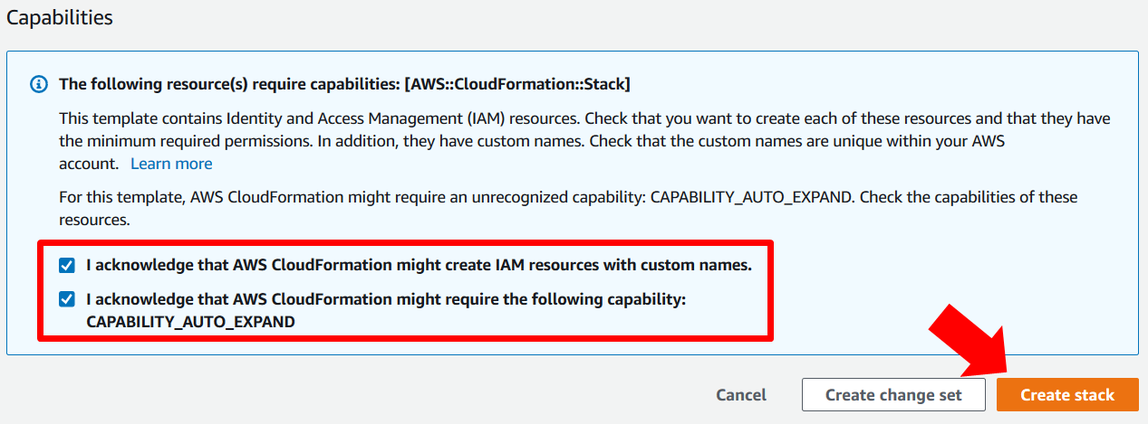
The deployment of the stack starts when you click “Create Stack”. The deployment will take about 10 to 15 minutes which you can use to familiarize yourself with the scenario for this workshop as well as the fundamental concepts described in the following.

